BQSuite Help Center
BQSuite Quick Links and Guides
Open BQSuite
BQSuite Features (as of September 2025)
BQSuite Frequently Asked Questions
How to Get Question Sets In BQSuite
How to Share Purchased Question Sets with Your Church Coaches and Quizzers
How to Add Quizzers to Monitor
How to Assign Tasks to Quizzers
How to Practice Missed From A Quote Session
BQSuite for Coaches - How to use BQSuite at weekly quiz practices
BQSuite for Quizzers - Quizzer Dashboard
BQSuite for Quizzers - Learn Section
Getting Started
First Steps
- Each user needs to have their own account using a unique email address. If your child does not have an email address, you can create a free Google Gmail Account and choose the "For my child" option.
- Register for an account using a unique email address.
- Login to your registered account.
- After login, you can purchase either a monthly subscription or full quiz season access (through July 27, 2027) from the Subscribe Page.
Monthly Subscription
If you purchased a monthly subscription and still see the Subscribe Page when you login, totally close the app and/or logout and then login again. It can take a few minutes for the purchase to be auto-activated.
Quiz Season Subscription (Access until July 27, 2027)
- If you purchased quiz season access and do not see your purchased code(s) on the Subscribe Page, totally close the app and/or logout and then login again. It can take a few minutes for your purchased codes to appear. When they do appear, use one of the codes to activate your account if desired. Follow the onscreen instructions to provide quiz season access for all of the users/codes.
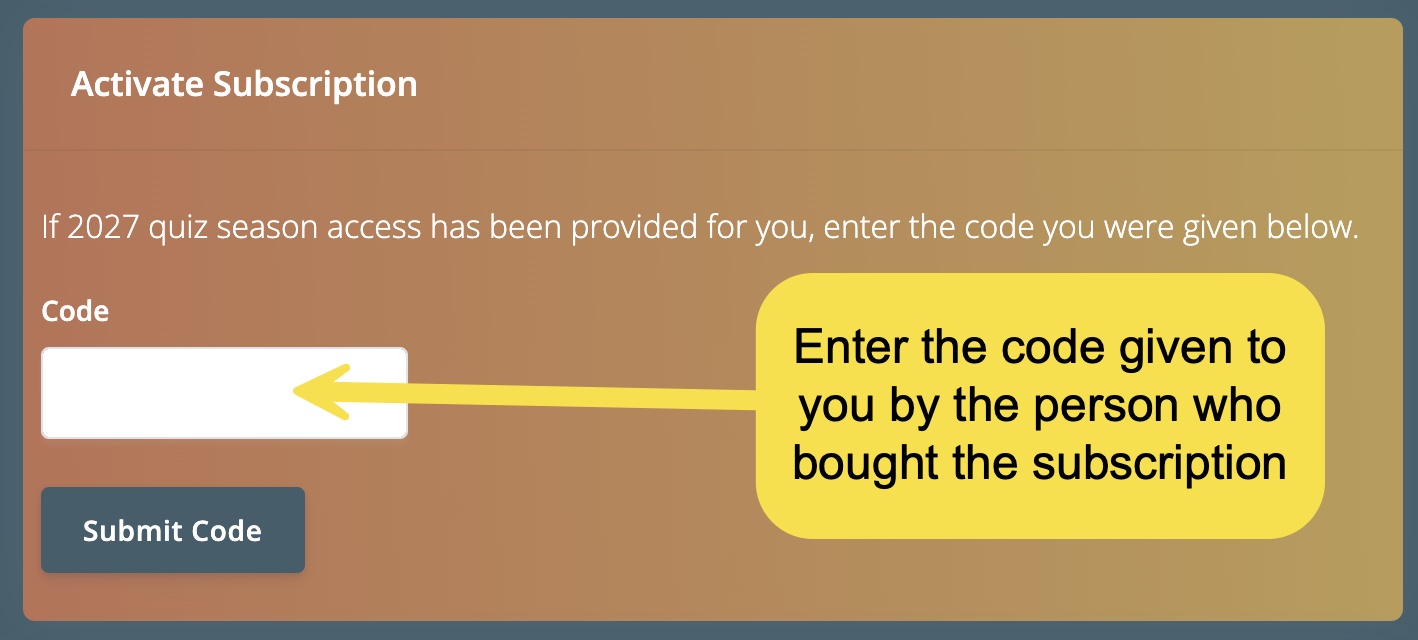
- If someone else purchased quiz season access for you, login and scroll down on the Subscribe Page to the section called Activate Subscription. Enter the code given to you by the person who bought the subscription and Submit Code to activate your account.
Add to Homescreen on Mobile Device
For BQSuite to look and act like an app, you must add it to your device homescreen.
Some browsers might include an "Install" icon in the URL bar when the user navigates to the page:

When you select the icon, the browser displays a prompt asking if you want to install the app, and if you accept, the app is installed.
For Apple devices, in Safari click the "share" icon.

In the “share” menu, scroll down past your contacts and suggested apps and tap “Add to Home Screen”.

You will then be redirected to your home screen where you should see your new app saved.
Forgot Your Password?
On the login page (https://www.bqsuite.com/auth/login), click Forgot Password? in lower left. Then check that email account. If you do not receive the reset email within a couple of minutes, below are some tips to find it or reset again.
Check Spam/Junk and “Other”/“Promotions”/“Updates” tabs, and search inbox for sender noreply@bqsuite.firebaseapp.com and for the subject line “Reset your password”.
Add noreply@bqsuite.firebaseapp.com to Contacts/Safe Senders, then trigger another reset.
If you use Microsoft 365/Outlook, check Quarantine and Message Trace (admin) or Safe/Blocked senders. Office 365 sometimes blocks Firebase Auth emails aggressively.
Try again later and avoid requesting multiple resets in a minute (mail systems may throttle).
BQSuite Dashboard
Coach Dashboard
Quizzer Dashboard
On the dashboard you have quick access to all parts of BQSuite. You can also view your progress, set a learning goal, and update your latest verse learned.
 - Each day every quizzer gets one attempt to play the two daily challenges. Leaderboards are available for yesterday, today, and the last 7 days.
BQSuite Learn Section
- Learn New Verse - Learn a new verse by clicking stars to remove a few letters at a time. Click a star, then say the verse without hesitation before clicking the next star. When the last star is clicked, the screen is blank and you should be able to quote the verse from memory.
- View Verse Cards - Study color coded verse cards interactively with clickable cross reference links and interactive pronoun identifications.
- Reference Builder - Given a unique verse beginning, build the reference by selecting the book, then the chapter, then the verse number.
- Timed Practice - Practice using time drills.
- List Verses - List color-coded and interactive verses in study order, Bible order, alphabetical order, or horizontal (all 1s, all 2s, etc).
- View Advanced Study Stacks - Study front and back of digital cards over verse beginnings, verse endings, missed vbs, 1x, 2x, 3x, and 4x (int, exp) time words, cross reference phrases, question prep (beg, jr), and pronouns (int, exp). Study stacks are automatically saved so you can go back to them right where you left off.
Access and use the Verse Information Button
BQSuite Games Section
 BQBubble Game - a bubble popping game
 BQChoice - a multiple choice game
 BQMatch a matching game
 BQSpeed - a fill-in-the-blank game with Easy, Medium, and Hard levels for every verse of study
 BQWhack - a game similar to Whack-A-Mole
 BQBattle - a multiple choice group game to use at quiz practice where quizzers race each other to get the highest score
BQSuite Quote Section
- Create New Drill - create a verse quote session, or drills over verse beginnings, verse endings, or 1x, 2x, or 3x words. For quote sessions, there are many options:

- Create Drill from Recent Missed - Create a quote session over just what you recently misquoted, or a drill over recently missed verse beginnings.
- During a quote session, the quoter view and quizzer view stay in sync, speeding up quote sessions and making remote quoting over a phone easy.
- A quizzer can self-quote, and speech-to-text helps verify that the quoting is correct.
Quick Quote Feature
Outdated but still useful on how to use BQQuote
BQSuite Toolbox Section
- BQLookup - Material lookup for all divisions. Use a / to do multiple lookups at the same time.
- BQScore - keep score on any device, including phones
- Buzzer - a virtual buzzer system. Includes an individual buzzer to practice with one quizzer.
- BQQuest - Quizzers can hear and buzz-in on questions, practicing their interruption and question-answering skills. Coaches can create quizzes as given or over a range of verses random, and even over question types and point values.
- Audio Player - Add audio to every verse of study. Purchase your songs from BQSongs, QuizJams, or any song provider that allows file download. You can use your own files, use read verses instead of songs, or use any audio source you desire and can mix and match audio sources so you associate your favorite, reagardless of origin, with each verse of study.
